Sales and discount codes
The free plugin gives you a shop-wide sale and full discount codes. Automatic discounts, which fire on quantity or order value without a code, are part of Bang! Cart Pro.
Everything here lives on the Discounts tab.
The rule that governs all of them
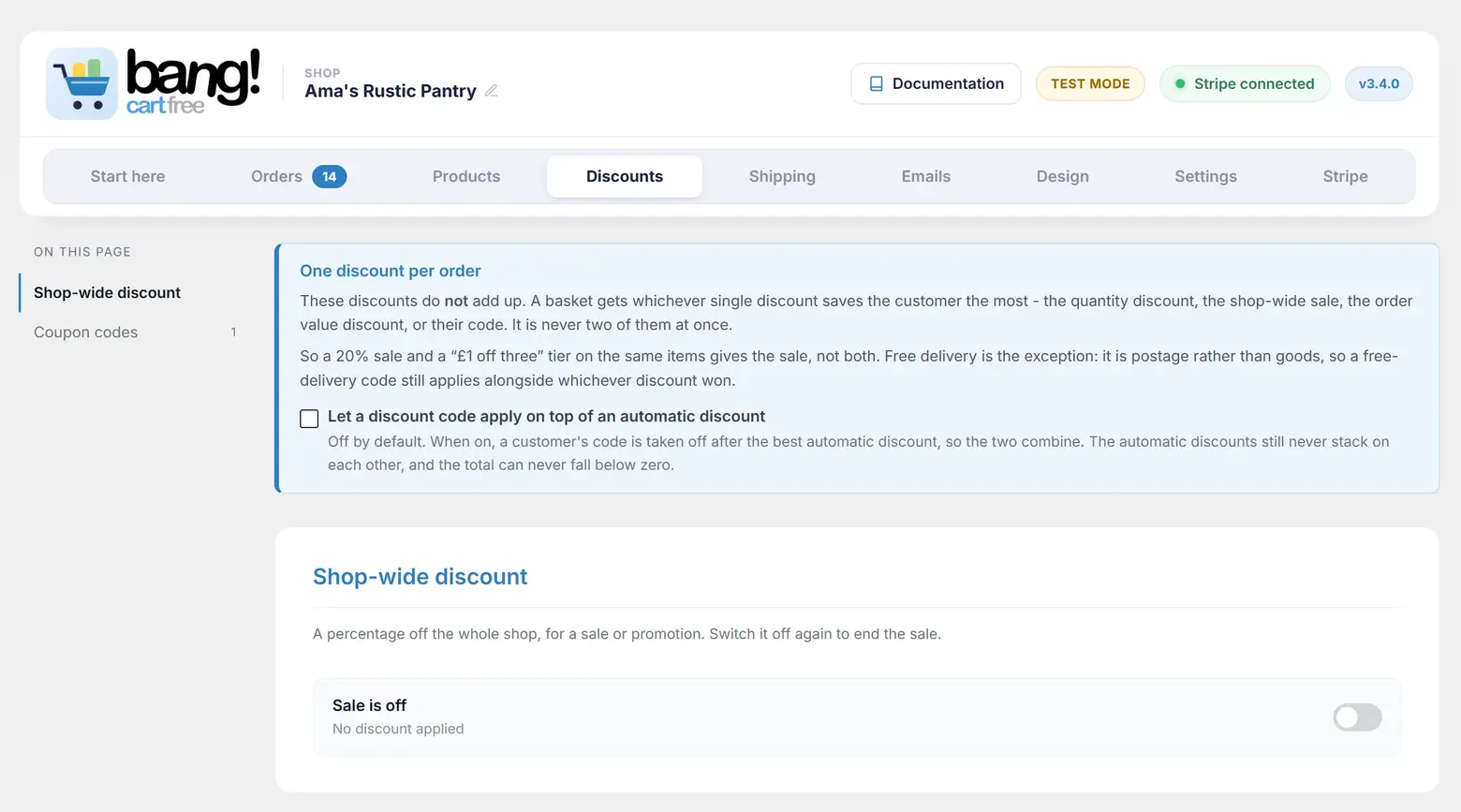
One discount per order, and the customer gets the biggest one. Discounts do not add up. If a basket qualifies for more than one, whichever saves the most is the one that applies, and you never have to remember to switch one off before switching another on.
So a 20% sale running alongside a "buy six, save £3" rule gives the shopper whichever saves them more on that basket - never both.
Free delivery is the exception, because it is postage rather than goods. A free-delivery code still applies alongside whichever discount won.
The shop-wide sale
A percentage off everything, for as long as you leave it on. Set the percentage, write a banner message if you want one, choose its text colour, and switch it on.
The sale is applied as a price, not as a lump taken off at the end, so a £5.50 item at 20% off is charged as £4.40 and reads that way everywhere, including on Stripe's page. The [bangcart_price] shortcode shows the sale price with the old one struck through beside it, unless you ask it not to.
Use [bangcart_sale_banner] anywhere in your template to announce it. The admin's copy button hands out the older name [sale_banner]; both do the same thing. It renders nothing while the sale is off, so it can live there permanently.
Discount codes
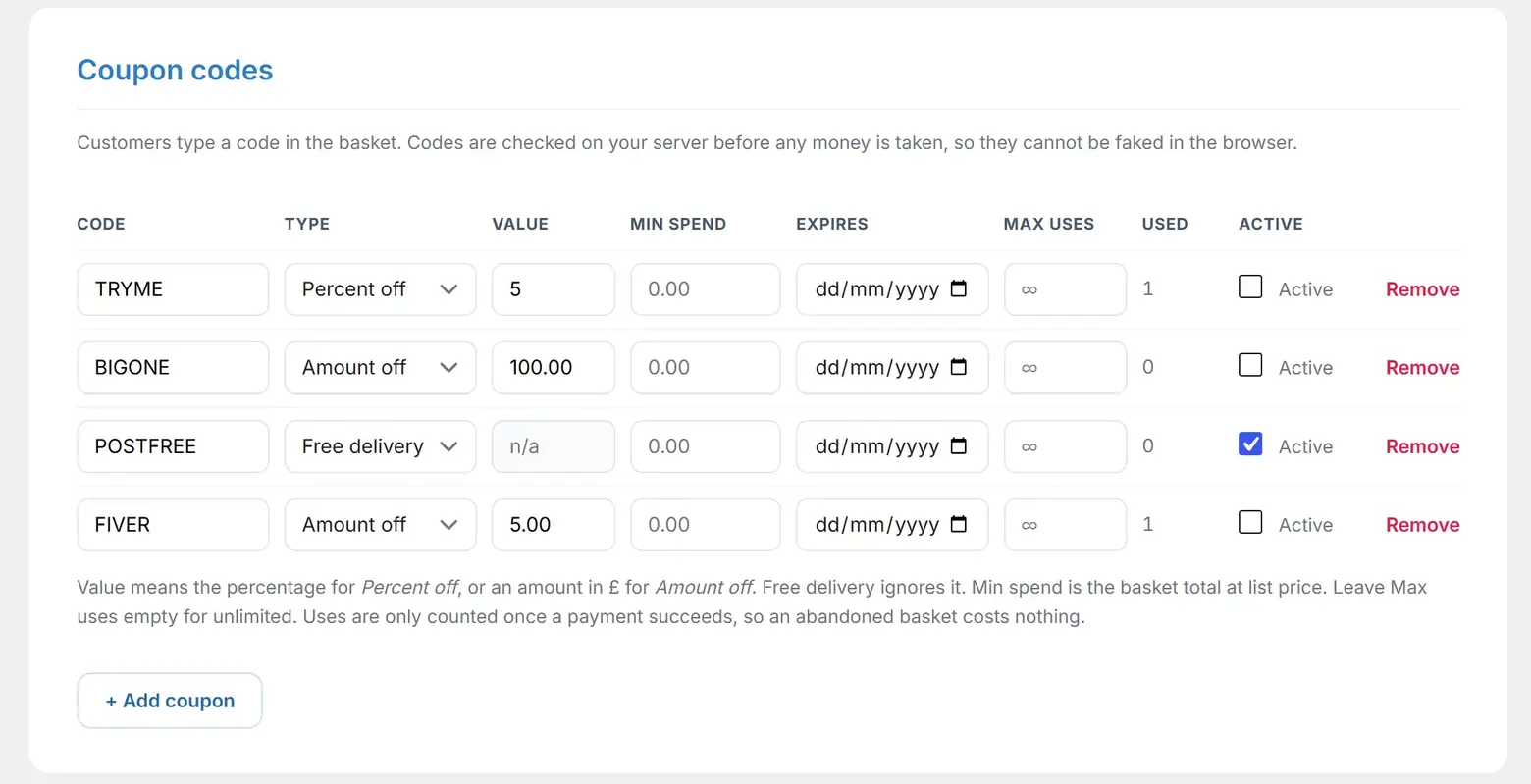
Codes a customer types into the basket. Each row on the Coupon codes table gives you:
| Field | What it does |
|---|---|
| Code | What the customer types. Letters, numbers, hyphens and underscores; stored in capitals. |
| Type | Percent off, Amount off, or Free delivery. |
| Value | The percentage or the amount. Ignored for free delivery. |
| Min spend | Only valid on orders at or above this. Measured on the goods at list price. |
| Expires | A date, inclusive, in your site's timezone. The code works all day on that date. |
| Max uses | Leave it empty, or 0, for unlimited. Otherwise the code stops working once it has been used that many times. |
| Used | A read-only counter. You cannot edit it, and nothing you type there is honoured. |
| Active | An on/off switch, so you can pause a code without deleting it or losing its history. |
There is no start date, no per-product restriction and no per-customer limit.
When a use is counted
At payment, not at checkout. An abandoned basket never burns a limited code. The count is taken under a lock, so two customers redeeming the last use of a code in the same second cannot both get through.
A code that is rejected for minimum spend is remembered and reapplied automatically if the basket grows past the threshold, so a customer does not have to type it again.
When a code loses
If a customer types a perfectly valid code but one of your own discounts saves them more, the basket says Better discount applied and gives them the bigger saving. The code is not rejected and nothing is hidden. They simply get the better deal.
If there is nothing in the basket a code could apply to, it says Not valid on this order instead.
Letting a code stack
Since 3.2.7 there is a choice at the top of the Discounts tab: Let a discount code apply on top of an automatic discount. It is off by default.
Switch it on and a customer's code is taken off after the best automatic discount, so a code and a sale combine, which is how most shops actually work. What does not change: the automatic discounts still never stack on each other, only ever one of them applies, and the total can never fall below zero.
What is never discounted
Customer-set prices, where the buyer types the amount themselves for a deposit, a balance or a booking fee. The amount typed is the amount charged. No sale, no quantity rule and no code touches it.
A code still applies to the rest of the basket as normal. Customer-set prices are a Pro feature.
Free delivery
Two ways to offer it, and they are different tools.
- Free postage over a threshold, set on the shipping zone. Applies to everyone automatically, no code needed. See Postage zones and services, and note that it makes one service free rather than all of them.
- A free-delivery code, which zeroes the postage on that order. The customer still chooses which carrier.
Because free delivery sits outside the goods contest, a 20% sale and a free-delivery code will both apply to the same order. If you do not want that, switch the code off while the sale runs.
Turning things off
Everything has a switch, and nothing needs deleting to stop it. The sale has one, and every code has one. Switch a rule off and it keeps its settings, ready for next time.
Automatic discounts are a Pro feature. Quantity rules such as "buy 6, save £3" and order-value rules such as "spend £50, get 10% off" are added by Bang! Cart Pro. If you have had Pro and it lapses, a note on the Discounts tab explains that the rules were made with an add-on that is not active: they are kept untouched, baskets pay the list price, and no discount is ever guessed at.
Still stuck?
Write to me and it is me who answers, not a ticket queue. Tell me what you expected and what happened instead.


