Collection in person
Collection is not a pricing mode, it is a service that sits alongside your carriers. A zone can post and be collected from at the same time.
Switching it on
Open the zone on the Shipping tab and tick Offer collection in person. It appears in the basket beside your postage services, at no charge.
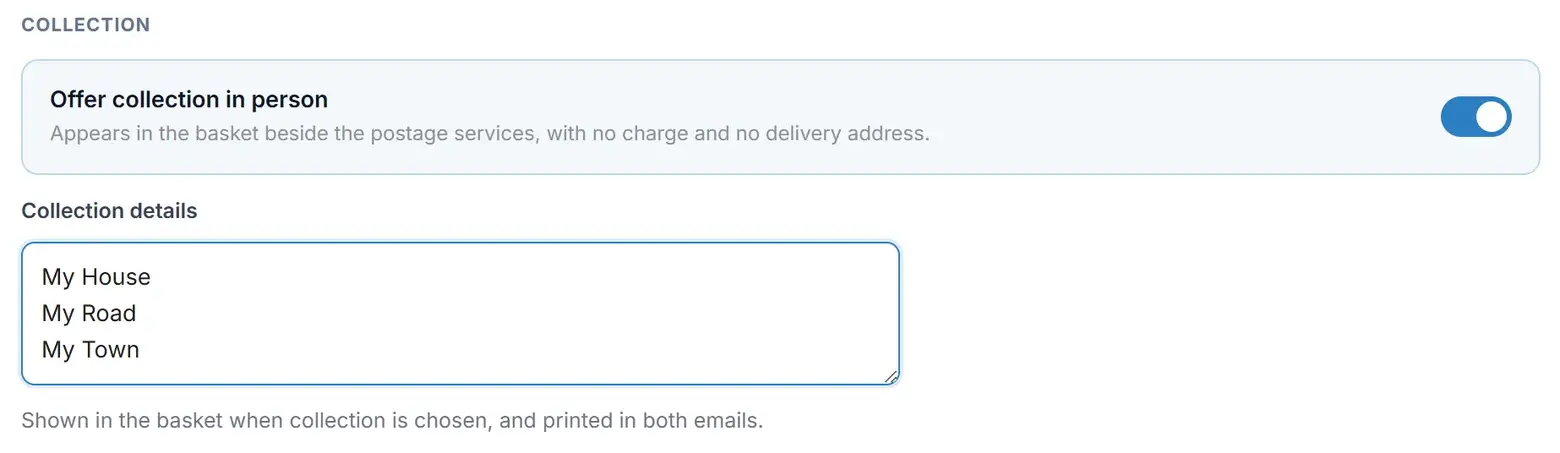
Underneath, fill in Collection details. This is free text and it does a lot of work, so write it properly:
14 Mill Road, Cambridge CB1 2AA. Saturdays 9am to 1pm.
The important part: no address is asked for
When a customer chooses collection, the Stripe checkout session is built without shipping address collection and without shipping options. Stripe never asks them for a delivery address.
That is deliberate and it matters more than it sounds. An address sitting on a collection order is how something gets posted by mistake.
Where your collection details appear
Everywhere the customer might look for them, which means you write them once:
- In the basket, as soon as collection is chosen.
- On Stripe's payment page, as a zero-priced line reading Collection in person - no delivery with your details beneath it, and again in the text beside the pay button.
- On the thank-you page after paying.
- In the customer's confirmation email.
- In your seller notification.
- On the order status page the customer reaches from their email.
The wording changes throughout
A collection order is not a posted one, and the plugin does not pretend otherwise. The button on a collection row of the Orders tab reads Mark collected rather than Mark posted, the button in your seller email reads Mark as collected, and the confirmation page it opens says so too. The mark records the handover - the moment your customer picked the order up - just as Mark posted records the moment a parcel went out.
On the customer's status page the headings change to match:
| State | What the customer reads |
|---|---|
| Not yet marked | Being prepared - "We are getting your order ready. Your collection details are below." - with your collection details on the page. |
| Marked collected | Collected - "Your order was collected on [date]." |
Note what the unmarked state does not say: it makes no promise to email the customer when the order is ready. The customer's signal to come is your collection details - the address and hours you wrote - in their confirmation email and on the status page itself.
The Design tab has preview buttons for both states: Order status (collection) and Order status (collected), each showing the real page before a customer sees it.
Collection and the order limit
Your maximum units per order never blocks a collection order. Somebody collecting twenty jars is not a parcel problem, so an oversized basket in a zone that offers collection keeps the collection option and gets a note rather than an error. If you have written your own large-order message, the note uses your words, with the collection offer after them.
Collection only, no posting
Perfectly possible. Leave the zone switched on, clear all its postage prices, and tick collection. Remember that a price of 0 means a service is not offered, so clearing the prices is exactly the right way to do this.
Do not switch the zone off to achieve it. A switched-off zone disappears from the basket entirely, taking its collection option with it, and if it is your only zone nobody can check out at all.
Collection keeps working even when postage does not. If a zone is priced with a band mode and the add-on that set it is not active, the zone shows NO POSTAGE and quotes nothing - but still offers collection. Your customers can still buy.
Still stuck?
Write to me and it is me who answers, not a ticket queue. Tell me what you expected and what happened instead.


