The welcome email
A different email from the invitation, sent at a different moment, to somebody who by now has an account. It exists to give them their username and a way back in.
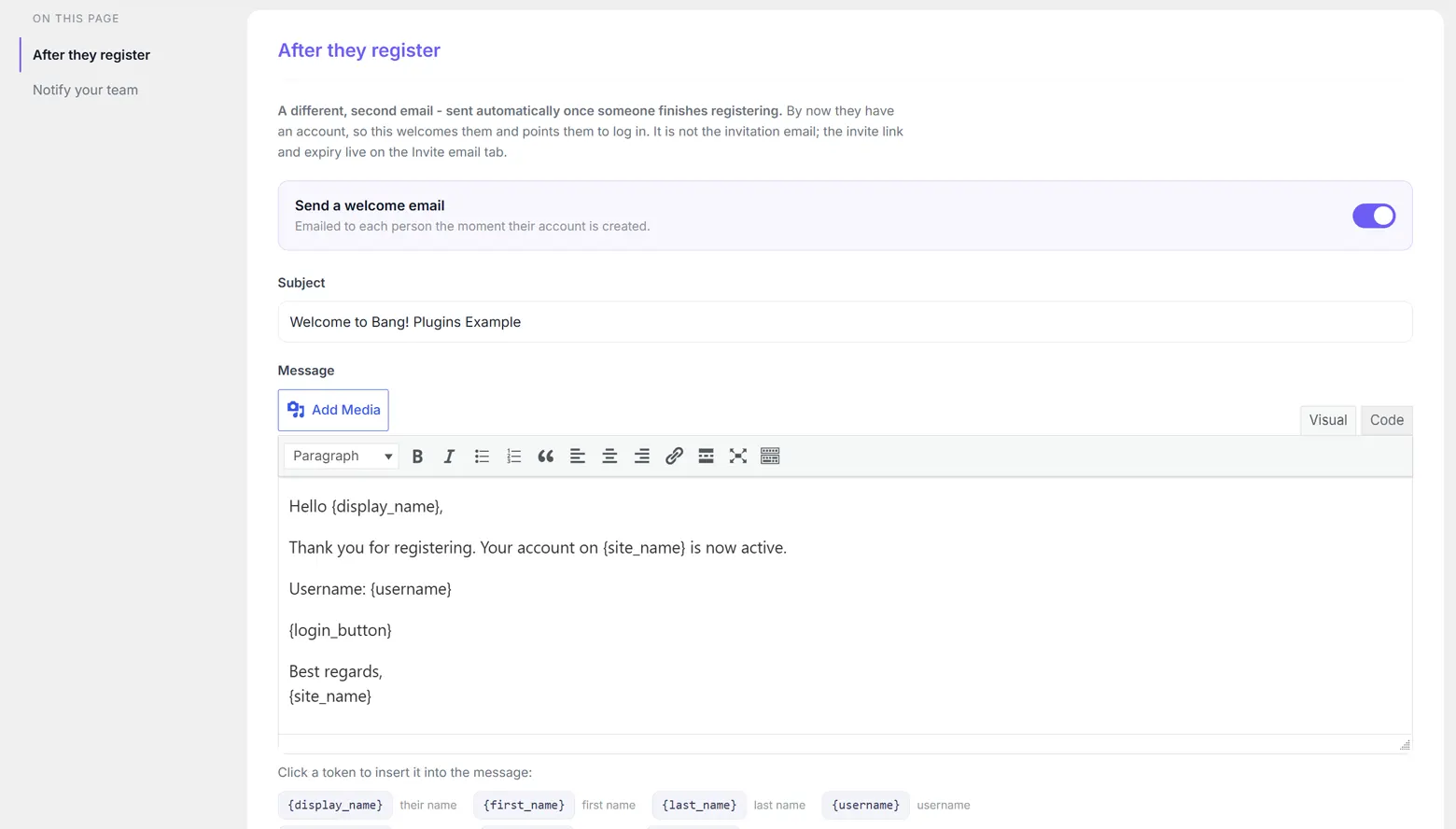
When it is sent
The moment a registration completes, alongside the account being created. Not when you send the invitation, which is the other email entirely.
It is on by default. The switch at the top turns it off if your site already welcomes people some other way.
Subject and message
The subject starts as Welcome to followed by your site name. The message uses the same full editor as the invitation email, with media, formatting and both Visual and Text modes.
The default reads:
Hello {display_name},
Thank you for registering. Your account on {site_name} is now active.
Username: {username}
{login_button}
Best regards,
{site_name}
The seven tokens
| Token | Becomes |
|---|---|
{display_name} | Their full name, for example Jane Bell. |
{first_name} | Just the first name, for a warmer greeting. |
{last_name} | Just the surname, for a formal one. |
{username} | The username the plugin generated for them, for example jane.bell. |
{login_button} | A styled Log in button pointing at your chosen login page. |
{login_url} | The same address written out as a plain link. |
{site_name} | Your site title. |
Keep {username} in. Nobody chose it, so nobody will remember it. They can also sign in with their email address, but the email that tells them their username is the one they will search their inbox for in six months.
Where the Log in button points
At whatever you have chosen under Where clients log in on the Settings tab: the standard WordPress login screen, any page on your site, or a custom URL. Both {login_button} and {login_url} follow it, so changing the setting updates every welcome email from then on.
If your site has a membership plugin or a themed login page, point it there. Sending a client to /wp-login.php when you have built them a proper front door is a small thing that reads as a rough edge.
Its colours and its sender
The Log in button uses the same colours as the invitation email's button, set on the Invite email tab, and the email goes out under the same From name and From email. Set those once and both emails match.
Telling your own team
Alert these addresses on each new registration, at the foot of the tab, takes a comma-separated list. Each one gets a short plain-text message the moment somebody registers:
Subject: New registration: jane.bell
A new user has registered.
Username: jane.bell
Email: jane@example.com
Leave the field blank for none. Invalid addresses in the list are ignored rather than breaking the send.
Stopping WordPress adding its own
WordPress sends its own new-account email whenever a user is created, which would arrive alongside yours saying much the same thing in its own words. Silence WordPress's own account emails on the Settings tab is on by default and suppresses it, leaving your welcome email as the only one that arrives.
Using another registration plugin? That plugin probably sends a confirmation of its own, and the two will double up. Turn this welcome email off, or turn theirs off, but do not leave both on. See Using another registration plugin.
Next
Settings reference lists every remaining setting in one place.
Still stuck?
Write to me and it is me who answers, not a ticket queue. Tell me what you expected and what happened instead.


