Tracking invitations
Every invitation you have ever sent, newest first, with its status and everything you can do about it. This is where you chase the people who have not got round to it.
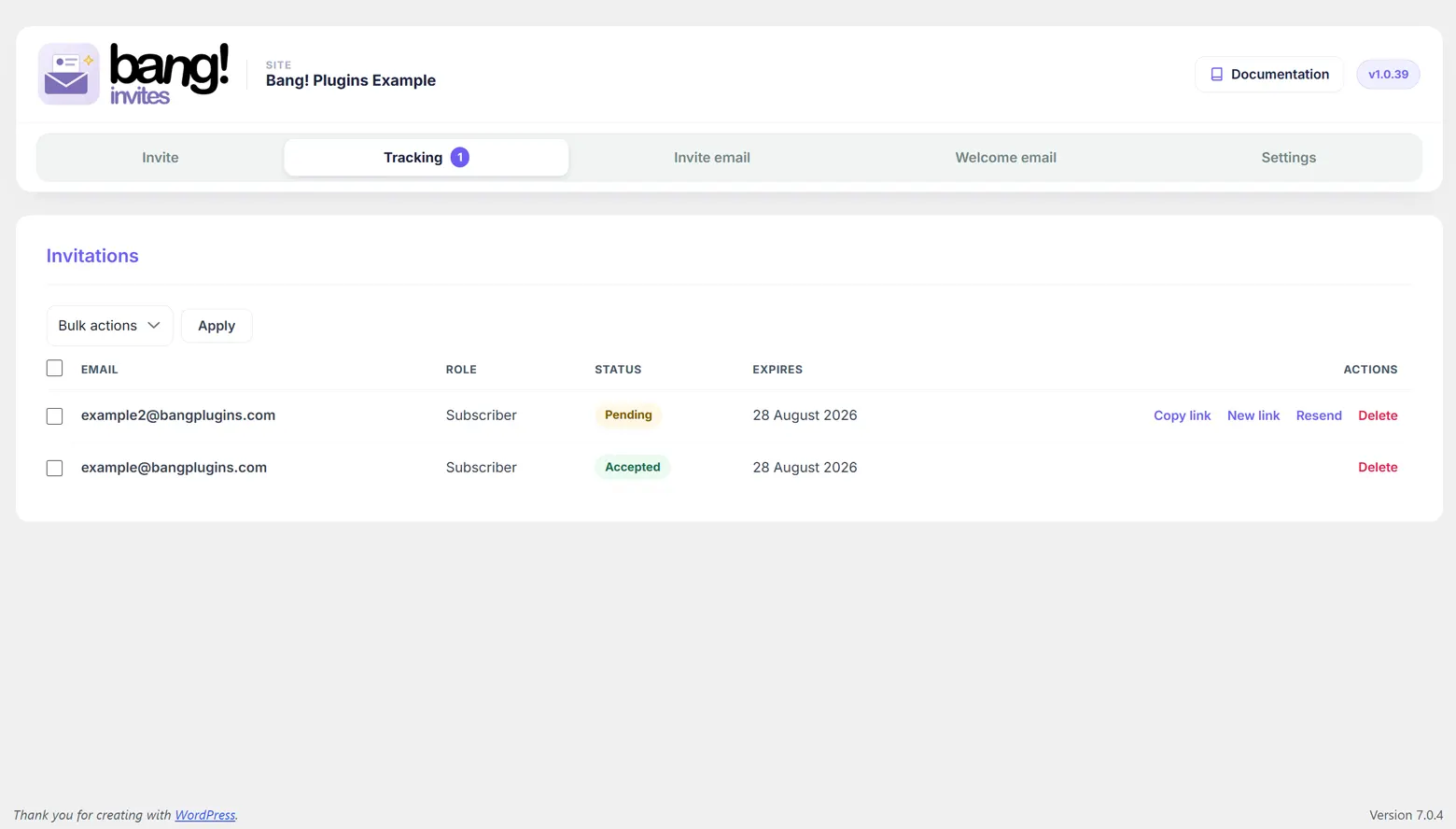
The three statuses
| Status | Means |
|---|---|
| Pending | Sent, not yet used, not yet expired. The link works. |
| Accepted | They registered. The link is spent and will never work again. |
| Expired | The date passed without anyone using it. The link is dead, but the record is kept so you can see who never took it up. |
Nothing here is a label somebody set. Each row's status is worked out from the record every time the page loads, so a Pending row becomes Expired on its own the moment its date passes.
The actions
| Action | What it does | Shown on |
|---|---|---|
| Copy link | Puts the live invitation URL on your clipboard, for sending by any means you like. | Pending only |
| New link | Issues a fresh code with a fresh expiry, without emailing anything. The previous link stops working immediately. | Pending and expired |
| Resend | The same as New link, and emails the invitation again. | Pending and expired |
| Delete | Removes the record. Asks first. | Every row |
Copy link is deliberately absent on an expired row, because that link is dead and copying it would only send somebody to an error. Use New link or Resend instead, both of which issue a working one.
An accepted invitation offers only Delete. There is no way to reopen it: a registered account is not a pending invitation, and generating a new link for one used to be possible from a stale tab, which flipped a real account's row back to Pending. Since 1.0.38 it cannot. If somebody genuinely needs to register again, delete their WordPress user and send a fresh invitation.
Deleting several at once
Tick the rows, choose Delete in the bulk actions box at the top, and press Apply. The checkbox in the header row selects everything.
Deleting a record never touches the account. Removing an Accepted row tidies your list and leaves the person's WordPress user exactly where it was. Removing a Pending row does kill that invitation, because the record is the invitation.
The Role column tells you the truth, not the history
Where an account exists for that address, the Role column shows the role that account has now, not the role the invitation was stamped with. If you invited somebody as a Subscriber and later promoted them, this column says what they actually are.
For a pending invitation, with no account behind it yet, it shows the role the invitation will grant.
The list keeps itself honest
Three things happen without you asking, all of them to stop the list disagreeing with reality:
- Re-inviting an address clears its earlier records, pending and accepted alike, so you get one fresh Pending row rather than a new one beside a stale one.
- Deleting a WordPress user clears their Accepted record, so the list never claims an address has registered when there is no account behind it. Any Pending invitation for that address is deliberately left alone: with the account gone, that link is live again, which is the right outcome.
- Nothing is ever quietly resurrected. An invitation you delete is gone, and its link stops working at once.
The pending count in your toolbar
The Bang! Invites item in the WordPress toolbar carries a badge with the number of invitations that are pending and not yet expired, which is the number of people you are waiting on. Its submenu links straight here. Turn it off under Settings > Behaviour.
Next
The invitation email covers the email these links travel in.
Still stuck?
Write to me and it is me who answers, not a ticket queue. Tell me what you expected and what happened instead.


